印蕉 Printing Banana
Product

Boarding Pass Wedding Invitation

500+ sold

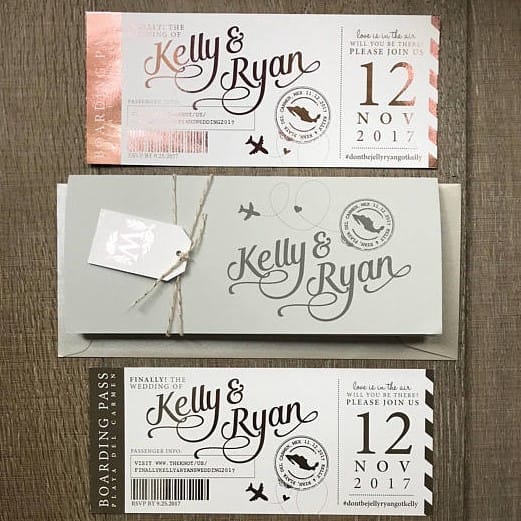
Boarding pass wedding invitations offer a modern alternative to traditional invitations and are ideal for destination weddings. Printing Banana can help you create a distinctive design, whether your wedding is abroad or local.
Printing Material
Included Finishing
Foil Stamping
Foil Colour
Number of Designs
Design
Price
HK$ 1.00

Product Introduction

Boarding Pass Wedding Invitations: Break with Tradition and Express Your Love Creatively

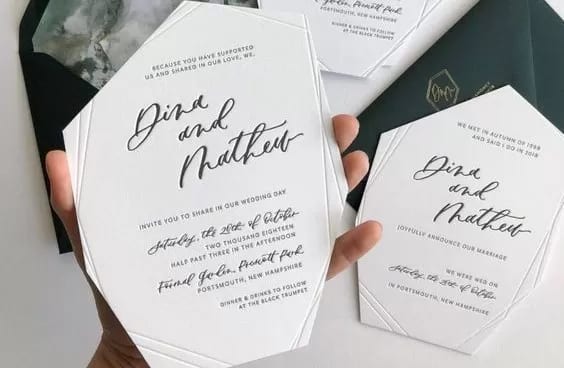
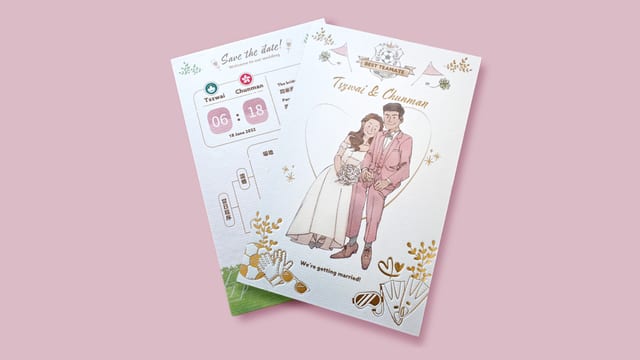
Printing Banana knows that many couples do not want to use traditional wedding invitations because they feel too old-school. Many people now also choose to get married abroad, making boarding pass wedding invitations the perfect choice for you. Printing Banana offers a variety of paper stocks for you to choose from and is dedicated to creating wedding invitations that are just right for you.


Printing Notes:

  • Colours displayed on screen or printed using proofing machines not operated by our company cannot be used as colour samples for print comparison.
  • Samples from artwork not printed by our company, or from printed products that have been stored for too long and changed colour through oxidation, cannot be used as colour samples for print comparison.
  • Colour samples can only be used to check printing on coated art paper; for all other paper stocks, they are for reference only.


Other Notes:

  • SF store collection or courier delivery is available. The standard courier charge for general commercial and industrial areas is HK$20 for the initial weight, with additional charges for other areas.
  • Our company does not provide proofreading. Before approving the artwork, please carefully check that all information is accurate and correct. Once the artwork has been approved,
  • we will print and deliver according to the customer-approved artwork; the customer is responsible for any other errors or omissions.
  • Cards can have one additional cut for a HK$10 processing fee. However, the folded-card offer does not include additional cutting.
  • If customers require other card sizes, quantities or finishing options, please specify them when placing the order.


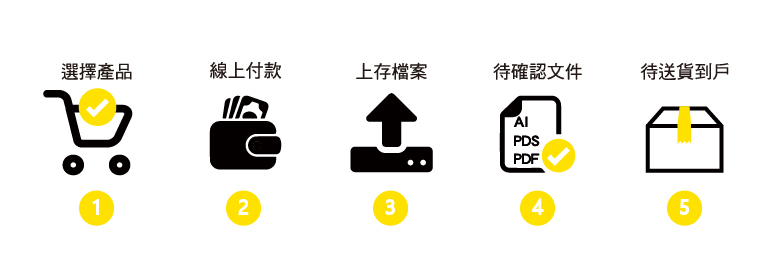
Purchase Process


Artwork Preparation Notes

Card Artwork Dimensions:

  1. The standard card artwork size is 96x60mm, including a 3mm bleed on each side, while the finished size after trimming is 90x54mm. Before exporting, please delete any objects outside the bleed area. There is no need to draw crop marks or crosshairs, and the card border must be set to no fill, as shown below:
  2. If no finished-artwork frame is set, the work area/page frame will be treated as the finished size by default. To ensure accuracy, please set the finished-artwork frame yourself; this ensures the correct finished dimensions.
  3. Keep important text, four-sided design borders or white margins at least 5mm inside the cutting line on all sides as a safe margin. Otherwise, the finished product may look skewed or have uneven margins after trimming.
  4. Card artwork dimensions are fixed at 3mm larger than the finished size on each side. For example, if the artwork size is 156x106mm, the finished size is 150x100mm and it will be priced as four card units. If the artwork size is 86x56mm and the finished size is 80x50mm, it will be priced as one card unit.

Card Artwork Preparation Notes:

Standard Card Artwork

  1. If you use Adobe Illustrator (AI) to create the card file, set the work area to the finished card size and set a 3mm bleed in Document Setup, then centre the content within the work area. Once the artwork is complete, convert the text to outlines, save the file as AI or PDF, and upload it. Before uploading, please review the notes in File Upload Instructions.
  2. When preparing card artwork, remember to place the front on the left and the back on the right.
  3. When exporting artwork using AI software, save each file separately. Whether it is an AI, PSD or PDF file, there must be one file for each person's name.
  4. When exporting artwork using Photoshop, name the front and back files separately for each person's card and compress the two files into the same folder. Each card artwork set therefore consists of two files.
  5. When uploading files, remember to confirm each option and quantity individually, then upload them in order to avoid errors and confusion.
  6. Before confirming the order, you must check again that the options and quantities for the uploaded files are correct.


Preparing Artwork for UV and Hot Foil Stamped Cards

  1. If finishing is required, you must create black artwork for the areas to be finished to indicate where the finishing is needed. Black artwork is only accepted as an AI vector file.
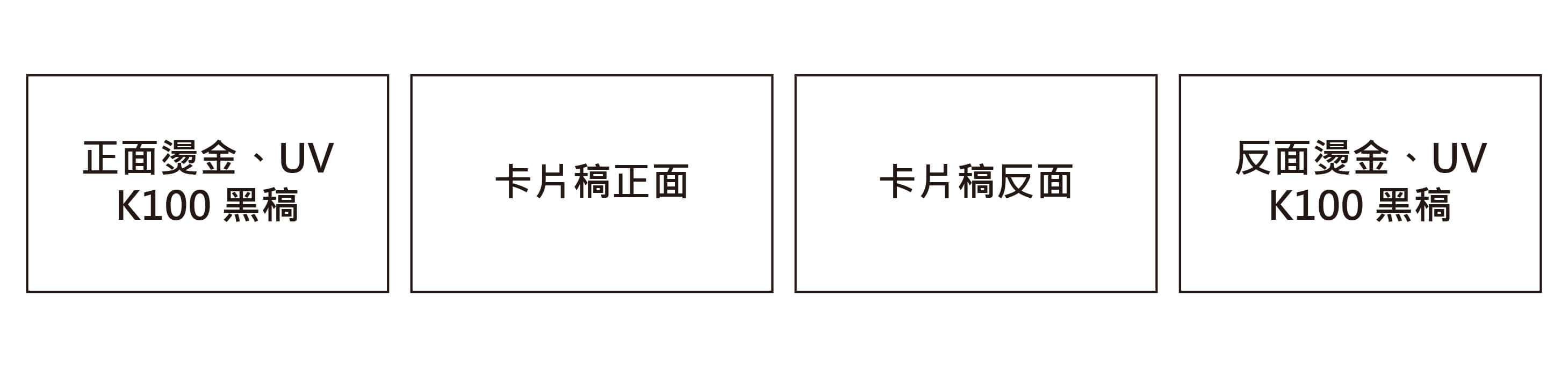
  2. As noted above, place the front of the card on the left and the back on the right. The black finishing artwork for spot UV, hot foil stamping and other finishes should be placed beside the side to be finished, with the front on the left and the back on the right, as shown:

  3. Areas for spot UV or hot foil stamping in the card artwork must be set to K100%.
  4. Avoid using graphics or text that are too small, too fine or overly complex, as the finished result may be unsatisfactory.
  5. Finished text must be no smaller than 8pt, lines must be no thinner than 0.6pt (0.2mm), and the distance between two hot foil areas must be no less than 0.7mm.
  6. Do not place UV or hot foil finishing areas too close to the cutting line or die-cut area, as pressure from the cutting blade may cause the UV or foil to peel off.
  7. A positional tolerance of 2–3mm for UV finishing is normal. To reduce the amount of misalignment, add a 1–2mm stroke when creating the black artwork.
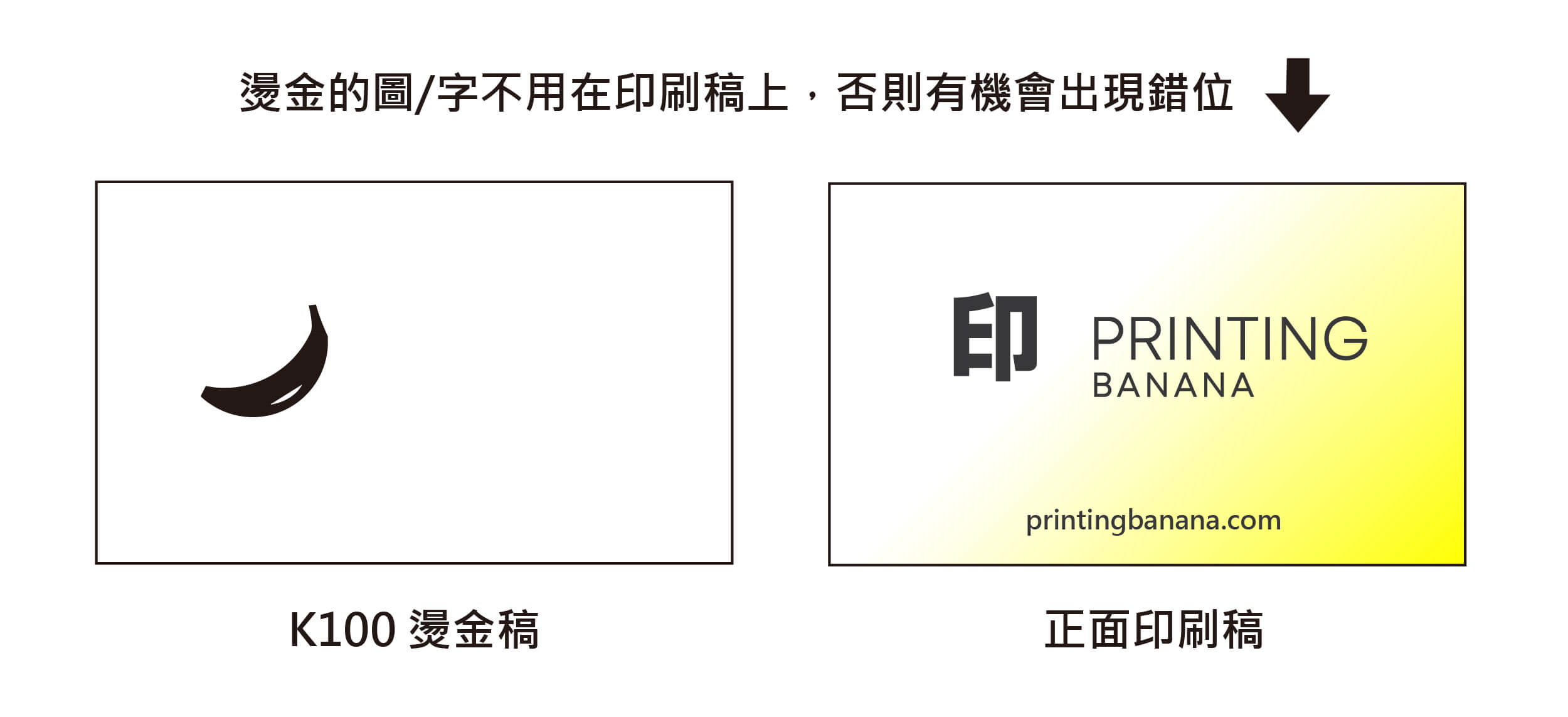
  8. Hot foil stamping has a tolerance of 0.5–1mm. To avoid misalignment between the foil position and the text or images on the printed side, the areas to be foil stamped must not appear in the print artwork, as shown:

🎨

Use CMYK

Create your artwork in CMYK colour mode and at the correct dimensions

🔍

Ensure image clarity

All images should look sharp at 100%, at a minimum of 300dpi or above

🄰

Create outlines

Convert all text to outlines and embed all images or linked objects

💾

Save your file

We accept PDF, AI and PSD source files; for special finishes we accept AI only

Looking for professional graphic design? 🎨

From posters and backdrops to booklets, we do it all! Let our professional design team craft eye-catching print work for you.
🖼️ Poster design | Exhibition backdrops | Promotional booklets
🎯 Professional print follow-up to ensure design fidelity
One-stop service: from design to print, all handled for you
Discount on your first order!

FAQ

More great content