A folded leaflet looks like one of the simplest print jobs going — but every so often a customer tells us the panels won't line up when they fold, or the fold feels stiff and catches instead of closing flat. You rarely see it on thin stock; on heavier paper it shows up fast. So whose fault is it — the printer's or the designer's? This piece walks through the design-file side of folded leaflets. If your artwork already covers everything below, the problem almost certainly sits in the printing itself, or in a miscommunication between the two of you.
Before we get into folding technique, you need to know how many ways a leaflet can be folded — and what makes each fold type behave the way it does.
Where the crease lines go
The crease (score line) position matters more than anything else on a folded leaflet — get it wrong and the whole piece fails. The first thing to pin down is which fold your job will use, because every fold type wants its creases in a different place. For a rundown of the fold styles themselves, see this article: Folded Leaflets Explained – Choosing the Right Fold for More Effective Promotion.
Accordion (Z) fold
An accordion fold is a Z-fold, so at design stage the creases only need to be spaced evenly. One thing to watch, though: even though the machine lays down those creases, machines have tolerances, and a crease can land slightly off. The deviation normally stays within 2mm, so keep important elements away from the panel edges in your design.
Roll fold
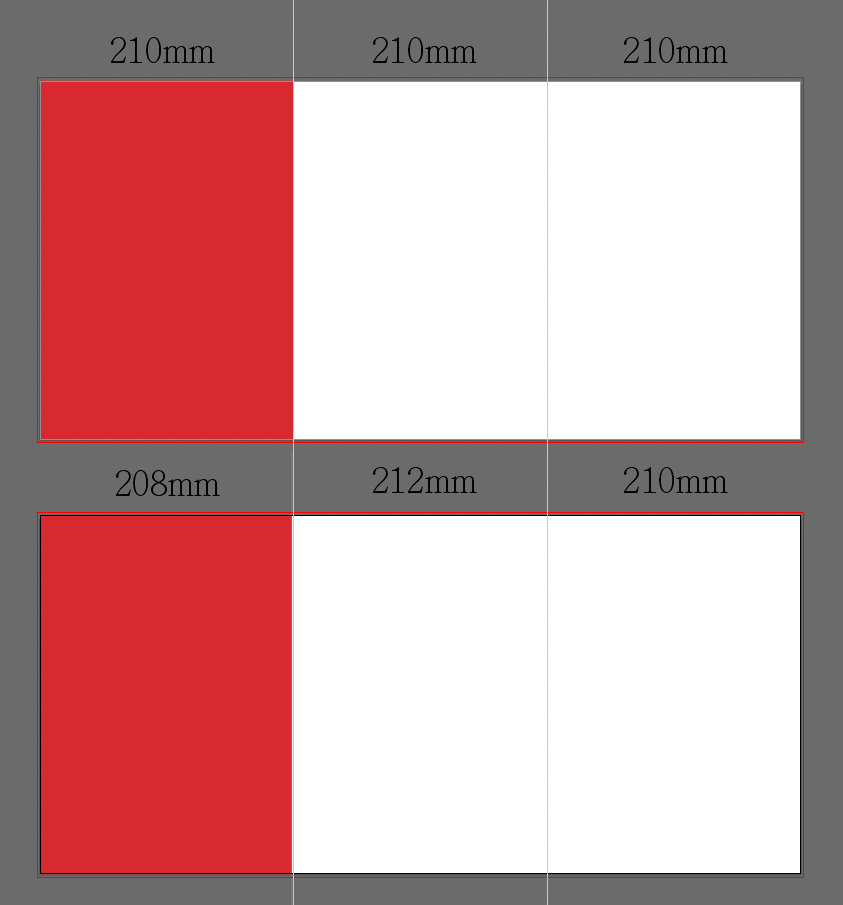
A roll fold tucks each panel inward. Because paper has thickness — and because the machine has its own tolerance — you can't space the creases evenly here, or the leaflet won't close. Take a two-crease roll fold as an example: if the left (red) panel is the one that folds in first, its crease needs to sit about 2mm further left than the even-split position. Your design has to shift along with the crease, of course. Do that and you get a clean roll fold — when it closes inward, that first panel isn't so tight that the other side struggles to shut over it.
Paper thickness
Paper weight has a make-or-break effect on folding. The more folds a piece has, the thinner the stock needs to be. Paper that's too thick cracks and splits along the fold; scoring and lamination can cut down that cracking, but then you hit the opposite problem — the piece won't stay closed. At that point you need a sticker to hold it shut.
No fold style really suits heavy stock. As a rule, anything at 350gsm or above starts to have trouble closing. Some papers are also just brittle — they can't take the stress of folding and crack under the pressure. Check with your printer before you commit to a stock.
Finished folded size
Size affecting whether a leaflet opens and closes might sound odd at first. But in our own testing, folding along the short edge is the one that tends not to close cleanly. On a piece whose long edge is several times its short edge, the paper's tension and the leverage across it make a short-edge fold hard to close flat.
There's a fix, of course: a perforated score line in place of a plain crease solves it. In some cases a double crease works too — though not every heavy stock takes well to double-scoring. Either way, ask us — WhatsApp +852 3001 5678, English is fine — and we'll look at your job and your requirements and suggest the best approach for it.
Folding looks simple — until it isn't
Even if your folded leaflet is a standard size, it's worth reading this through — especially the design and crease points. The common market sizes are already worked out, so they won't give you closing problems. But the things to watch in the design are still things to check carefully before you print.